spaces

POST /v1/spaces/{spacesId}/messages

Changed on

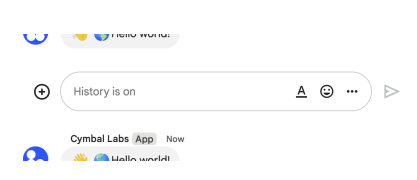
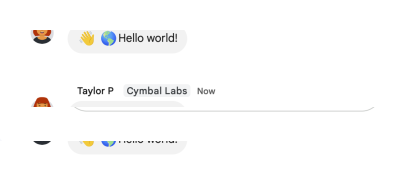
Creates a message in a Google Chat space. For an example, see Send a message. Supports the following types of authentication: - App authentication with the authorization scope: - https://www.googleapis.com/auth/chat.bot - User authentication with one of the following authorization scopes: - https://www.googleapis.com/auth/chat.messages.create - https://www.googleapis.com/auth/chat.messages - https://www.googleapis.com/auth/chat.import (import mode spaces only) Chat attributes the message sender differently depending on the type of authentication that you use in your request. The following image shows how Chat attributes a message when you use app authentication. Chat displays the Chat app as the message sender. The content of the message can contain text (text), cards (cardsV2), and accessory widgets (accessoryWidgets). Message sent with app authentication The following image shows how Chat attributes a message when you use user authentication. Chat displays the user as the message sender and attributes the Chat app to the message by displaying its name. The content of message can only contain text (text). Message sent with user authentication The maximum message size, including the message contents, is 32,000 bytes. For webhook requests, the response doesn't contain the full message. The response only populates the name and thread.name fields in addition to the information that was in the request.
Request

  • Base URL
    https://chat.googleapis.com
  • URL
    https://chat.googleapis.com/v1/spaces/{spacesId}/messages
  • Auth
    • OAuth 2 and OAuth 2
      Implicit: https://accounts.google.com/o/oauth2/auth
      Scopes: https://www.googleapis.com/auth/chat.bot
      Authorization code: https://accounts.google.com/o/oauth2/auth
      Token URL: https://accounts.google.com/o/oauth2/token scopes: https://www.googleapis.com/auth/chat.bot
    • or OAuth 2 and OAuth 2
      Implicit: https://accounts.google.com/o/oauth2/auth
      Scopes: https://www.googleapis.com/auth/chat.import
      Authorization code: https://accounts.google.com/o/oauth2/auth
      Token URL: https://accounts.google.com/o/oauth2/token scopes: https://www.googleapis.com/auth/chat.import
    • or OAuth 2 and OAuth 2
      Implicit: https://accounts.google.com/o/oauth2/auth
      Scopes: https://www.googleapis.com/auth/chat.messages
      Authorization code: https://accounts.google.com/o/oauth2/auth
      Token URL: https://accounts.google.com/o/oauth2/token scopes: https://www.googleapis.com/auth/chat.messages
    • or OAuth 2 and OAuth 2
      Implicit: https://accounts.google.com/o/oauth2/auth
      Scopes: https://www.googleapis.com/auth/chat.messages.create
      Authorization code: https://accounts.google.com/o/oauth2/auth
      Token URL: https://accounts.google.com/o/oauth2/token scopes: https://www.googleapis.com/auth/chat.messages.create

Path parameters

spacesIdstring required

Query parameters

createMessageNotificationOptions.notificationType'NOTIFICATION_TYPE_NONE' | 'NOTIFICATION_TYPE_FORCE_NOTIFY' | 'NOTIFICATION_TYPE_SILENT'

The notification type for the message.

messageIdstring

Optional. A custom ID for a message. Lets Chat apps get, update, or delete a message without needing to store the system-assigned ID in the message's resource name (represented in the message name field). The value for this field must meet the following requirements: * Begins with client-. For example, client-custom-name is a valid custom ID, but custom-name is not. * Contains up to 63 characters and only lowercase letters, numbers, and hyphens. * Is unique within a space. A Chat app can't use the same custom ID for different messages. For details, see Name a message.

messageReplyOption'MESSAGE_REPLY_OPTION_UNSPECIFIED' | 'REPLY_MESSAGE_FALLBACK_TO_NEW_THREAD' | 'REPLY_MESSAGE_OR_FAIL'

Optional. Specifies whether a message starts a thread or replies to one. Only supported in named spaces. When responding to user interactions, this field is ignored. For interactions within a thread, the reply is created in the same thread. Otherwise, the reply is created as a new thread.

requestIdstring

Optional. A unique ID for this request. A random UUID is recommended. Specifying a request ID makes the request idempotent, which ensures that multiple identical requests with the same request ID result in only a single message being created. Subsequent requests with the same request ID return the existing message and do not update the message, even if the requested details differ from the current state. To use this field effectively: - Ensure that subsequent requests are identical and use the same authentication credentials as the original request. - If a message was already created with the provided request ID, the request returns that message. Note that the returned message might not be fully populated; the API echoes the message in your request with the system-assigned resource names populated. To retrieve the latest metadata for the message, call GetMessage. - Reusing an existing request ID with a different authenticated user results in an error.

threadKeystring

Optional. Deprecated: Use thread.thread_key instead. ID for the thread. Supports up to 4000 characters. To start or add to a thread, create a message and specify a threadKey or the thread.name. For example usage, see Start or reply to a message thread.

Request body

argumentTextstring

Output only. Plain-text body of the message with all Chat app mentions stripped out.

clientAssignedMessageIdstring

Optional. A custom ID for the message. You can use field to identify a message, or to get, delete, or update a message. To set a custom ID, specify the messageId field when you create the message. For details, see Name a message.

createTimestring google-datetime

Optional. Immutable. For spaces created in Chat, the time at which the message was created. This field is output only, except when used in import mode spaces. For import mode spaces, set this field to the historical timestamp at which the message was created in the source in order to preserve the original creation time.

deleteTimestring google-datetime

Output only. The time at which the message was deleted in Google Chat. If the message is never deleted, this field is empty.

fallbackTextstring

Optional. A plain-text description of the message's cards, used when the actual cards can't be displayed—for example, mobile notifications.

formattedTextstring

Output only. Contains the message text with markups added to communicate formatting. This field might not capture all formatting visible in the UI, but includes the following: * Markup syntax for bold, italic, strikethrough, monospace, monospace block, bulleted list, and block quote. * User mentions using the format . * Custom hyperlinks using the format `<{url}|{rendered_text}>` where the first string is the URL and the second is the rendered text—for example, . * Custom emoji using the format :{emoji_name}:—for example, :smile:. This doesn't apply to Unicode emoji, such as U+1F600 for a grinning face emoji. * Bullet list items using asterisks (*)—for example, * item. For more information, see View text formatting sent in a message

lastUpdateTimestring google-datetime

Output only. The time at which the message was last edited by a user. If the message has never been edited, this field is empty.

markupSyntax'MARKUP_SYNTAX_UNSPECIFIED' | 'MARKUP_SYNTAX_CHAT' | 'MARKUP_SYNTAX_MARKDOWN'

Optional. Specifies how the server interprets the message text field content when creating a message or updating the text field of a message. When calling UpdateMessage, set markup_syntax and text on the Message resource and include text (not markup_syntax) in update_mask.

namestring

Identifier. Resource name of the message. Format: spaces/{space}/messages/{message} Where {space} is the ID of the space where the message is posted and {message} is a system-assigned ID for the message. For example, spaces/AAAAAAAAAAA/messages/BBBBBBBBBBB.BBBBBBBBBBB. If you set a custom ID when you create a message, you can use this ID to specify the message in a request by replacing {message} with the value from the clientAssignedMessageId field. For example, spaces/AAAAAAAAAAA/messages/client-custom-name. For details, see Name a message.

silentboolean

Output only. Whether this is a silent message. Silent messages are messages where Chat suppresses push notifications for recipients.

textstring

Optional. Plain-text body of the message. The first link to an image, video, or web page generates a preview chip. You can also @mention a Google Chat user, or everyone in the space. To learn about creating text messages, see Send a message.

threadReplyboolean

Output only. When true, the message is a response in a reply thread. When false, the message is visible in the space's top-level conversation as either the first message of a thread or a message with no threaded replies. If the space doesn't support reply in threads, this field is always false.

Response

Successful response

argumentTextstring

Output only. Plain-text body of the message with all Chat app mentions stripped out.

clientAssignedMessageIdstring

Optional. A custom ID for the message. You can use field to identify a message, or to get, delete, or update a message. To set a custom ID, specify the messageId field when you create the message. For details, see Name a message.

createTimestring google-datetime

Optional. Immutable. For spaces created in Chat, the time at which the message was created. This field is output only, except when used in import mode spaces. For import mode spaces, set this field to the historical timestamp at which the message was created in the source in order to preserve the original creation time.

deleteTimestring google-datetime

Output only. The time at which the message was deleted in Google Chat. If the message is never deleted, this field is empty.

fallbackTextstring

Optional. A plain-text description of the message's cards, used when the actual cards can't be displayed—for example, mobile notifications.

formattedTextstring

Output only. Contains the message text with markups added to communicate formatting. This field might not capture all formatting visible in the UI, but includes the following: * Markup syntax for bold, italic, strikethrough, monospace, monospace block, bulleted list, and block quote. * User mentions using the format . * Custom hyperlinks using the format `<{url}|{rendered_text}>` where the first string is the URL and the second is the rendered text—for example, . * Custom emoji using the format :{emoji_name}:—for example, :smile:. This doesn't apply to Unicode emoji, such as U+1F600 for a grinning face emoji. * Bullet list items using asterisks (*)—for example, * item. For more information, see View text formatting sent in a message

lastUpdateTimestring google-datetime

Output only. The time at which the message was last edited by a user. If the message has never been edited, this field is empty.

markupSyntax'MARKUP_SYNTAX_UNSPECIFIED' | 'MARKUP_SYNTAX_CHAT' | 'MARKUP_SYNTAX_MARKDOWN'

Optional. Specifies how the server interprets the message text field content when creating a message or updating the text field of a message. When calling UpdateMessage, set markup_syntax and text on the Message resource and include text (not markup_syntax) in update_mask.

namestring

Identifier. Resource name of the message. Format: spaces/{space}/messages/{message} Where {space} is the ID of the space where the message is posted and {message} is a system-assigned ID for the message. For example, spaces/AAAAAAAAAAA/messages/BBBBBBBBBBB.BBBBBBBBBBB. If you set a custom ID when you create a message, you can use this ID to specify the message in a request by replacing {message} with the value from the clientAssignedMessageId field. For example, spaces/AAAAAAAAAAA/messages/client-custom-name. For details, see Name a message.

silentboolean

Output only. Whether this is a silent message. Silent messages are messages where Chat suppresses push notifications for recipients.

textstring

Optional. Plain-text body of the message. The first link to an image, video, or web page generates a preview chip. You can also @mention a Google Chat user, or everyone in the space. To learn about creating text messages, see Send a message.

threadReplyboolean

Output only. When true, the message is a response in a reply thread. When false, the message is visible in the space's top-level conversation as either the first message of a thread or a message with no threaded replies. If the space doesn't support reply in threads, this field is always false.

Changes

    • info

      the security scope https://www.googleapis.com/auth/chat.bot was added to the endpoint's security scheme Oauth2

    • info

      the security scope https://www.googleapis.com/auth/chat.bot was added to the endpoint's security scheme Oauth2c

    • info

      the security scope https://www.googleapis.com/auth/chat.messages.create was removed from the endpoint's security scheme Oauth2

    • info

      the security scope https://www.googleapis.com/auth/chat.messages.create was removed from the endpoint's security scheme Oauth2c